
In Seated With Love, a Photo Marker is a visual venue element that allows planners and venues to place real-world venue photos directly onto the event floor plan. Photo markers help couples and event planners better understand how the actual venue space looks from specific locations within the layout.
By dragging and dropping a photo marker onto the floor plan, users can attach a photo link that represents the real-life perspective from that exact position in the venue. This feature helps create a more immersive planning experience by combining the digital seating layout with real venue visuals.
Photo markers make it easier for couples, planners, and venue teams to visualize table placement, guest views, and important areas of the event space while designing the floor plan.
What Are Photo Markers Used For?
Photo markers help enhance venue visualization and event planning within the Seated With Love platform. They are commonly used to:
-
Show real-life venue photos directly within the floor plan
-
Provide couples with visual context of the event space
-
Display the perspective from specific locations in the venue
-
Help planners understand how different layout areas look in reality
-
Improve communication between venues, planners, and couples
By placing photo markers throughout the floor plan, planners can give users a clear visual reference for different sections of the venue layout.
How Photo Markers Work in the Floor Plan
Photo markers can be placed anywhere within the Seated With Love Floor Plan Editor. Once added, each marker represents a specific location within the venue layout.
Users can:
-
Drag and drop a photo marker onto the floor plan
-
Attach a link to a venue photo
-
Place markers at important areas such as:
-
Ceremony spaces
-
Reception areas
-
Dance floors
-
Head tables
-
Scenic viewpoints
-
When users interact with a photo marker, they can view the associated venue photo and understand what the space looks like from that perspective.
Why Photo Markers Are Helpful for Event Planning
Photo markers help create a more interactive and visual floor planning experience in Seated With Love. By combining floor plan layouts with real venue imagery, planners can:
-
Help couples visualize their event setup
-
Show the guest perspective from specific seating areas
-
Provide context for table placement and venue features
-
Improve collaboration between venues, planners, and couples
-
Reduce confusion when reviewing the event layout and seating chart
Photo markers make it easier for everyone involved in the planning process to connect the digital floor plan with the real venue environment.
How to Upload a Photo Marker in the Floor Plan Editor (Seated With Love)
In Seated With Love, a Photo Marker allows venues and planners to attach real-world venue photos directly to a location within the floor plan. Uploading a photo marker helps couples and event planners visualize what the venue looks like from a specific position in the layout, improving the overall event planning experience.
By placing photo markers on the floor plan, users can connect the digital venue layout with real-life images of the event space, making it easier to understand table placement, guest perspectives, and important venue areas.
Steps to Upload a Photo Marker in Seated With Love
Follow these steps to add and upload a photo marker to your floor plan:
-
Open the Floor Plan Editor
Log in to your Seated With Love account and navigate to Edit Floor Plan for the event. -
Open the Venue Elements Section
Locate the Venue Elements panel within the Floor Plan Editor. -
Select “Photo Marker”
Click on the Photo Marker option from the available venue elements..png?width=552&height=729&name=Untitled%20design%20(6).png)
-
Place the Photo Marker on the Floor Plan
Drag the photo marker onto the desired location within the floor plan canvas. -
Select the Photo Marker
Click on the photo marker icon that you placed on the floor plan. -
Upload a Photo
In the marker settings panel, select Upload Photo and choose an image file from your computer. -
Save the Floor Plan
Save your changes to ensure the photo marker and uploaded image are applied to the floor plan.
What Happens After Uploading a Photo Marker?
Once a photo marker image is uploaded:
-
The marker will display the attached venue photo
-
Users can click the marker to view the image
-
The photo will represent the real-life perspective from that location in the venue
-
The floor plan becomes more visual and easier to understand for couples and planners
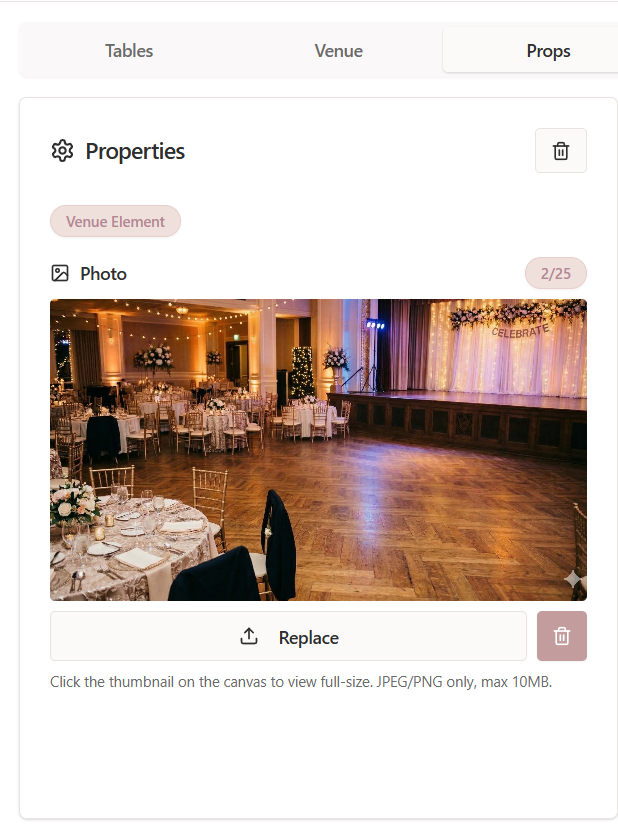
Photo markers help connect the digital seating layout with real images of the event space.
Why Use Photo Markers in a Floor Plan?
Adding photo markers to your Seated With Love floor plan helps planners and venues:
-
Provide visual context for different areas of the venue
-
Show couples what the space looks like from specific seating areas
-
Improve communication during the planning process
-
Make floor plans more interactive and informative
-
Help couples better understand table placement and event flow
Using photo markers allows teams to create a more immersive and visually detailed event planning experience.