
Seated With Love allows users to link a Matterport 3D virtual tour directly to an event floor plan layout. Adding a Matterport tour helps event planners, venues, and couples visualize the event space with a real virtual walkthrough while designing the seating chart and venue layout.
By connecting a Matterport 3D tour URL to your floor plan, users can explore the actual venue environment, making it easier to understand the space, confirm table placement, and plan guest seating more accurately within the Seated With Love floor plan editor.
Steps to Upload a Matterport 3D Tour in Seated With Love
Follow these steps to link a Matterport virtual tour to your floor plan:
-
Open Floor Plan Settings
Log in to your Seated With Love account and open the floor plan settings for the event or venue.
-
Locate the Matterport 3D Tour URL Field
Find the field labeled “Matterport 3D Tour URL.”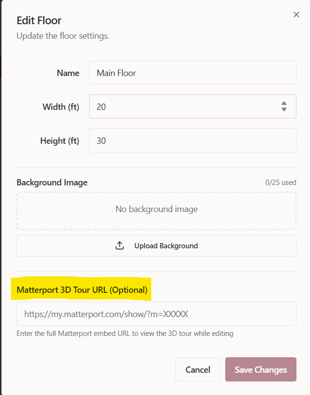
-
Paste the Matterport Tour Link
Copy the shareable Matterport virtual tour link and paste it into the URL field. -
Save the Floor Plan Settings
Save your changes to apply the Matterport tour to the floor plan.
What Happens After Uploading a Matterport Tour?
Once the Matterport 3D tour link is saved:
-
The tour becomes linked to the floor plan
-
Users can launch the virtual walkthrough of the venue
-
Event planners can compare the digital floor plan layout with the real venue space
-
Teams can visualize table placement, seating arrangements, and event flow
This integration helps ensure that the seating chart and floor plan design match the actual venue environment.
Why Use a Matterport 3D Tour With Your Floor Plan?
Adding a Matterport virtual tour to your Seated With Love event floor plan helps planners:
-
Explore the venue in an immersive 3D walkthrough
-
Verify table spacing and layout positioning
-
Understand room dimensions and architectural features
-
Improve event layout accuracy before the event day
-
Collaborate more easily with venue teams and event coordinators
Combining a Matterport 3D venue tour with the Seated With Love floor plan editor creates a powerful visual planning experience for weddings, corporate events, and large venue layouts.