
When creating a new wedding in Seated With Love, you may have chosen a wedding website template or floor plan template for the couple. However, if you were unsure at the time—or need to update those settings later—you can easily manage them from the wedding’s management page.
This allows you to enable, disable, or change templates at any time for a specific wedding.
Important: If you change the floor plan template for a wedding that already has one assigned, the existing floor plan and any seating charts created by the couple will be deleted. A new floor plan will be generated based on the newly selected template.
Be sure to confirm with the couple before changing the floor plan template if they have already started organizing their seating.
Steps to Manage Templates for a Wedding
-
Log in to Seated With Love
Sign in to your Seated With Love dashboard. -
Navigate to Weddings
Click Weddings and locate the wedding you want to manage. Then click the Manage button.-png.png?width=1244&height=522&name=Untitled%20design%20(11)-png.png)
-
Open the Templates section
In the left-hand panel, click Templates.-png.png?width=1296&height=826&name=Untitled%20design%20(12)-png.png)
-
Edit the template settings
Click the Edit button for either Wedding Website Templates or Floor Plan Templates to update the settings.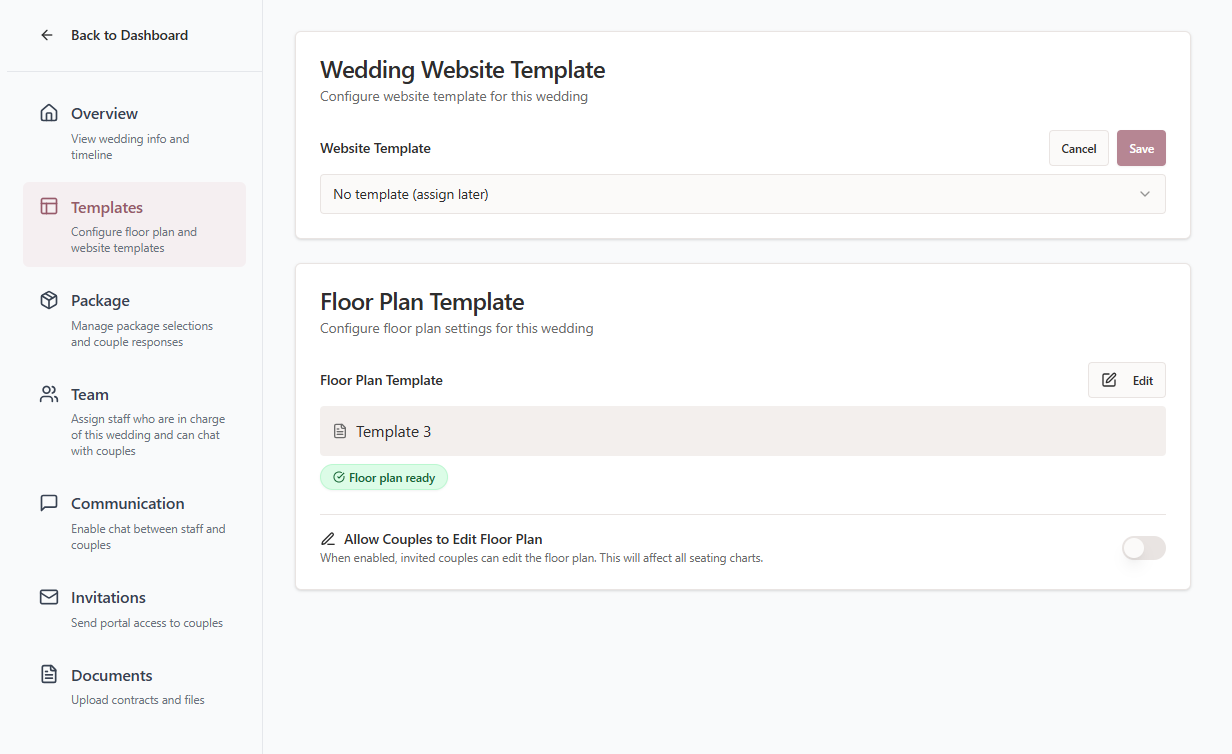
Wedding Website Template Options
When editing the Wedding Website Template, you can choose from the following options:
-
Disabled
The couple will not have access to a wedding website through the platform.
Note: If the couple has already created a website, it will no longer be visible until the feature is enabled again. -
No Template / Assign Later
Couples will be able to create a website using the default template option. -
Assign a Template
Choose a website template you previously created to provide a pre-designed starting point for the couple.
Floor Plan Template Options
When editing the Floor Plan Template, you can choose how couples will manage their seating layout.
-
Disabled
Couples will not be able to seat guests using the platform. -
Assign Floor Plan
A copy of a floor plan template will be created for the couple’s wedding.
This floor plan can be edited for the specific event without affecting the original template. -
Allow Couples to Choose
Select from a list of your existing floor plan templates, and the couple will be able to choose the one they prefer.
Note: By default, couples cannot edit floor plans. This means only venue staff can make changes to the seating layout.
However, venues can choose to allow couples to edit the floor plan if they want couples to manage their own seating arrangements.
This setting can be adjusted when configuring the floor plan template for the wedding.
Tip: You can update these template settings at any time to adjust how couples use the wedding website and floor plan tools during the planning process.