
In Seated With Love, users can export their event floor plans to share layouts with venues, planners, couples, and event teams. Exporting a floor plan allows you to create visual copies of the layout that include tables, seating arrangements, venue elements, and building elements.
The platform supports multiple export formats so users can choose the best option for presentations, documentation, or printing. Floor plans can be exported as PNG images, PDF documents, or Word files, depending on how the layout needs to be shared.
Exporting a floor plan helps planners communicate the complete event layout clearly and professionally.
Export Options Available in Seated With Love
Seated With Love provides several export options to accommodate different planning and sharing needs.
Export as PNG (Image)
-
Exports the current floor only
-
Generates a high-quality image of the floor plan
-
Ideal for sharing layouts in emails, presentations, or visual references
Export as PDF
-
Can export the current floor or all floors in the venue layout
-
Creates a print-friendly document
-
Useful for sharing with venues, planners, or event staff
Export to Word Document
-
Can export the current floor or all floors
-
Creates a Word document that includes the floor plan layout
-
Helpful for event planning documentation and reports
These export options make it easy to distribute clear and professional event layouts to everyone involved in the planning process.
Steps to Export a Floor Plan in Seated With Love
Follow these steps to export your event floor plan:
-
Open the Floor Plan Editor
Log in to your Seated With Love account and open the Floor Plan Editor for your event. -
Locate the Export Option
Find the Export button or export menu within the floor plan interface..png?width=670&height=344&name=Untitled%20design%20(12).png)
-
Choose an Export Format
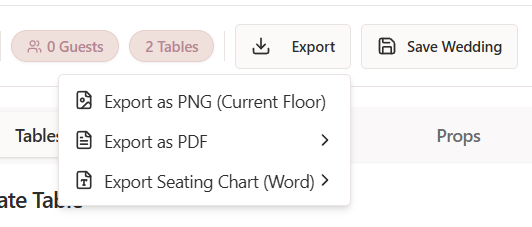
Select one of the available export formats:-
Export as PNG
-
Export as PDF
-
Export to Word
-
-
Select the Floor(s) to Export
Depending on the format, choose whether to export:-
The current floor only
-
All floors in the floor plan
-
-
Generate the Export File
Confirm the export selection to generate the file. -
Download the File
The exported floor plan will download to your device and can be shared or printed as needed.
What Happens After Exporting a Floor Plan?
Once a floor plan is exported:
-
A downloadable file is generated in the selected format
-
The file will include the current layout of the floor plan
-
You can share the layout with event teams, venues, or clients
-
The export can be used for planning documents, presentations, or printouts
Exported floor plans make it easier for teams to review and coordinate event layouts outside the Seated With Love platform.
Why Exporting a Floor Plan Is Helpful
Exporting floor plans helps planners communicate event layouts and seating arrangements clearly. By exporting layouts, users can:
-
Share the venue setup with vendors and staff
-
Provide visual references for event setup teams
-
Include floor plans in planning documents
-
Print layouts for on-site coordination
Using the export feature ensures that everyone involved in the event understands the final venue layout.
✅ Tip: Export your floor plan as a PDF when sharing with vendors or venue staff, as PDFs are easier to print and distribute during event setup.