
If a couple loses their Client Portal link, you can quickly copy the link again and send it to them. This allows couples to regain access to their wedding planning portal, where they can manage their event details and communicate with the venue.
Follow the steps below to copy the Client Portal link.
Steps to Copy the Client Portal Link
-
Log in to Seated With Love
Sign in to your Seated With Love dashboard. -
Navigate to Weddings
From the main navigation, click Weddings.-png.png?width=670&height=281&name=Untitled%20design%20(11)-png.png)
-
Find the wedding
Locate the wedding for the couple whose portal link you want to resend.-png.png?width=670&height=427&name=Untitled%20design%20(12)-png.png)
-
Click “Manage”
Click the Manage button for that wedding to open the wedding management page. -
Copy the Client Portal link
On the Overview page, click the Copy Client Portal Link button.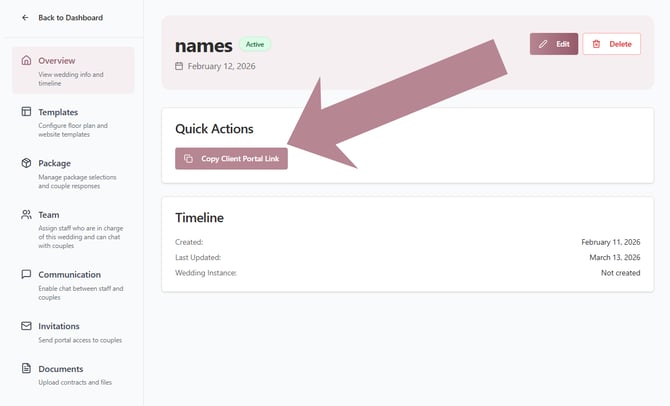
-
Send the link to the couple
Paste the copied link into an email or message and send it to the couple so they can access their planning portal again.
Tip: If a couple cannot find their portal link, copying and resending the Client Portal link is the fastest way to restore their access.