Wedding venues often have multiple team members involved in planning and managing events, including venue managers, coordinators, and operations staff. Seated With Love allows you to invite staff members to your organization so your entire team can collaborate while preparing for weddings and events.
By adding team members, your staff can work together inside the same venue account to manage layouts, plan event setups, and coordinate wedding logistics. This helps ensure everyone on your team is aligned and working from the same information when preparing for upcoming events.
In this guide, you'll learn how to invite staff members to your organization.
Before You Start
Ensure you are logged into Seated With Love and that you have Organization Administrator permissions. Only administrators can invite new members.
Steps to Invite a Staff Member
-
Log into Seated With Love.
-
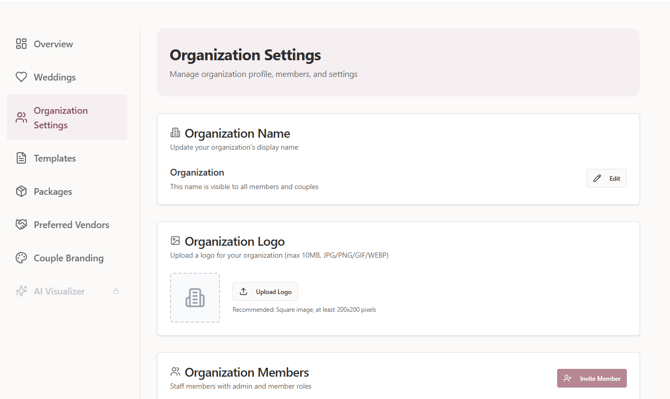
Navigate to Organization Settings from your main account dashboard as shown below.
-
Scroll down to the Organization Members section. The member management area is highlighted in the screenshot below.
-
Click Invite Member.
.png?width=670&height=422&name=Untitled%20design%20(5).png)
-
Enter the email address of the person you would like to invite.
-
Select the role you want to assign to the user:
- Admin – Administrators have full access and can manage the organization, invite members, and manage subscriptions.
- Member – Members can use the platform and collaborate with the team but cannot invite other members or manage subscriptions.
-
Send the invitation. The person you invited will receive an email allowing them to join your organization.
Please Note: Only organization administrators can invite new members. If you do not see the Invite Member option, you may need to contact an administrator on your team.